The interesting part of an AI tool is often what it refuses to do.
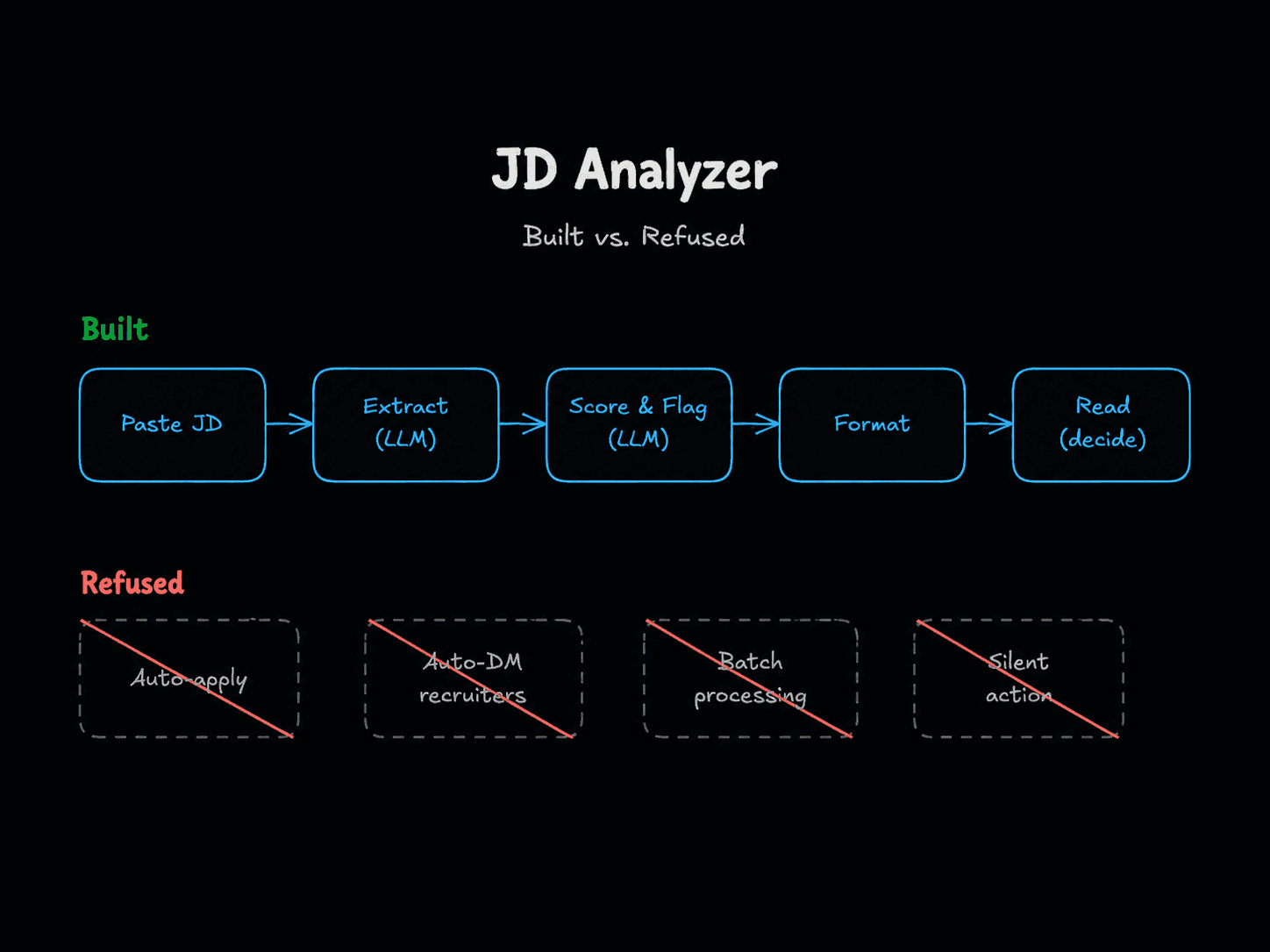
This week I open-sourced a small n8n workflow called JD Analyzer. It takes a job description I paste in, scores it against my profile across five dimensions, and flags risks with evidence cited from the JD itself. MIT licensed. V1.04. I built it for myself and tested it against three real postings before pushing it public.
It is, by design, not very ambitious.
There is no auto-apply. No automated outreach. No batch processing of fifty postings in the background. No "interested!" templates fired at recruiters on my behalf. The tool will sit there inert until I paste something into it, and then it returns a structured opinion I am free to ignore.
That is the entire point.
AI-assisted job triage works because it helps me decide whether a job fits my goals, not because I can auto-apply to a thousand ones that don't. The refusals are what make it trustworthy.
This article is about why those refusals are the design, not a roadmap of missing features.
The state of AI job tools is, charitably, a mess
If you have spent any time on LinkedIn lately you have seen the flood: extensions and SaaS products promising to auto-apply to hundreds of jobs a day, auto-generate cover letters, auto-DM recruiters, "let AI handle your job search." The pitch is always the same — volume as a substitute for fit.
The result is predictable. Recruiters are drowning in obviously-generated applications. Some are quietly blacklisting the tools by signature. Hiring managers I have spoken to spend more time filtering than reading. Candidates who use these tools get worse outcomes, not better, because the median application has gotten so noisy that real ones get harder to spot.
The category broke in the same way most "AI does it for you" categories break: the tool optimized for a metric (applications sent) that has almost nothing to do with the outcome anyone actually wants (a job that fits).
I did not want to add to that pile. I also did not want to not use AI for job search — the triage problem is real, and an LLM is genuinely useful for it. So I built the thing I actually wanted, which turned out to be a much smaller tool than the category suggests is possible.
What I actually wanted
The honest framing of my job search this year is: I am looking for senior IC roles in LLM applications, EU remote, and I would rather think clearly about ten roles than half-read fifty.
The problem is not that I cannot find postings. The problem is that the postings are inconsistent in shape, vague about what the role actually involves, and frequently mismatched against what their titles claim. "AI engineer" might mean RAG and agents. It might mean ML platform plumbing. It might mean CRUD with a chatbot bolted on. Reading carefully takes time, and "carefully" is the entire point — the cost of misreading a JD is showing up to a screening call already misaligned.
So what I wanted was: decision support, not delegation. Something that read each JD against my profile, surfaced the things I should probe in a screening call, and named the things that would likely make the role a hard no. Then got out of the way so I could decide.
That is a triage tool, not an autopilot. The distinction matters more than it sounds.
The build, and the refusals
The shape is small and on purpose. An n8n workflow with a form trigger, a profile blob held in a Set node, and three OpenAI calls — one to extract structured fields from the JD, two parallel ones to score fit and flag risks. The branches merge, a Code node formats the output as Markdown, and a form completion screen returns it to me. Three LLM calls per JD, about €0.0001–0.001 a run. The whole thing lives in Docker on localhost.
The architectural decisions are unglamorous and that is the point:
- Structured outputs. The extract step returns JSON with explicit fields. The score step returns five numbered dimensions with one-line rationales. The flag step returns a list of yellow and red flags, each with a JD evidence quote. There is no free-form "what do you think of this role" generation anywhere in the workflow.
- Evidence citation as a hard requirement. Every flag has to quote the part of the JD it is reacting to. This sounds bureaucratic. It is the single most important constraint in the design, and I will explain why in the next section.
- Conservative-by-default prompts. Silence in a JD is not a flag. Absence of disclosed compensation is not equity-only comp. Absence of a remote stance is not on-site. The prompts have to be told this explicitly — the model's instinct is to fill the form.
- One JD at a time, by human paste. No scraping. No queue. No batch. If I want to triage ten roles I paste ten JDs. The friction is the feature; it forces me to be in the loop.
And then the refusals. These are not items on a backlog. They are permanent design decisions, named in the README under "What it isn't":
- No auto-apply. Ever. The roadmap entry for V3 (auto-apply) is in the README purely so I can point at it and say "explicitly rejected." Recruiter blacklist risk aside, sending applications I have not personally decided to send is the line.
- No automated outreach. The tool does not DM recruiters, send connection requests, or fire "interested!" templates at anyone. If I am going to reach out, I am going to write it myself.
- No bulk processing without human review. Each JD analysis is a discrete event with a structured output the human reads. There is no fire-and-forget mode.
- No AI-screen-the-humans inversion. The tool screens job descriptions against my criteria. It does not screen recruiters, candidates, or anyone else. If a screening pass is happening, it is happening on the JD, and I am the one deciding what to do with the result.
- No silent failure mode. Output is always shown to me. There is no path where the workflow makes a decision on my behalf and acts on it.
None of those are technically hard to add. That is what makes naming them as refusals worth doing.
What operating LLMs honestly looks like
A few things showed up in the build that are worth naming, because they are the kind of failure mode that gets glossed over in tool announcements and matters a lot once a tool is in someone else's hands.
The hallucination problem. My first version of the risk-flagging prompt fired a "this role is on-site only" red flag on a JD that explicitly said remote_stance: "remote" in the extracted fields. It also fabricated an "equity-only compensation" flag on a JD where compensation was not disclosed at all. The model was treating my hard-reject list as a checklist to fill in, rather than asking whether the JD actually showed evidence of any of it. Classic LLM failure: pattern-completion over careful reading.
The fix that worked. Two changes. First, a sharper rule in the prompt: silence is not a flag. Absence of information is absence, not the worst-case interpretation of absence. Second, mandatory JD evidence citation for every flag — the model has to quote the part of the JD it is reacting to. Once it had to ground each flag in a real quote, the false positives essentially disappeared. The constraint forced the model to read, not to guess.
The calibration problem. Even with better prompts, gpt-4o-mini scored a JD for a core platform engineering role at a workflow-tooling company at 8/10 on LLM-apps alignment — because the model conflated "the company sells AI features" with "this role is LLM-apps work." It is not. That role is platform plumbing. Surface-level pattern matching beating careful reading is the failure mode I trust models to exhibit most often, and the reason I would not let a tool like this act on its own conclusions.
The boring engineering moments. n8n's Markdown-to-HTML node uses CommonMark and does not render tables, so the structured output renders flat. Underscores in field names like must_haves get parsed as italic delimiters and the output reads strangely. Both are five-minute fixes. They are also the kind of friction that shows up the moment LLM output meets a real rendering pipeline, and they are why "the LLM works" and "the tool works" are not the same claim.
None of this is a complaint about the model. It is the cost of operating LLMs day to day instead of demoing them. The work is in the prompts, the constraints, the structured outputs, and the seams where the model meets the rest of the system. Most of what makes an LLM tool feel reliable lives in those seams.
I am building toward production-grade RAG and agent work via active study — Chip Huyen's AI Engineering and the AI Engineering Buildcamp prep — and the pattern is the same all the way up. Constraints, evidence grounding, human review at meaningful points, refusals as a design choice.
Refusals are a design pattern
I wrote about this from a different angle a few weeks ago: the move from a single generalist AI agent to a governed multi-role collaboration system worked because it replaced vague flexibility with usable structure. Explicit ownership, controlled handoffs, human approval at meaningful points, memory and context as first-class concerns. Not autonomy. Coordination.
JD Analyzer is the same argument at single-tool scale.
The mistake the auto-applier category made was to treat "AI can do this" as a strong reason to let AI do it. The better question is: what does the tool need to refuse in order to be trustworthy? For a job-search tool, that list is long and obvious — anything that affects external communication, anything that commits me to a position I have not personally chosen, anything that acts on the model's interpretation without me reading it first.
Once those refusals are named, the remaining design space is small and useful. A triage tool. Decision support. Structured output a human reads. No silent action. That is the entire shape, and it is enough.
Try it, fork it, configure your own profile
The repo is at github.com/tp-coder/n8n-jd-analyzer. MIT. Docker compose up, import the workflow JSON, paste your own profile into the Set node, and you have your own version. The three example JDs in examples/jds/ include one fake US-only ML posting that exists purely to verify your hard-reject logic fires.
It is not a product. It will not become one. It is a personal triage tool I happen to think other people might find useful as a starting shape, and a small piece of evidence that AI tools get more trustworthy when you decide, early, what they are not going to do.
The refusals are the design. The rest is just plumbing.